Are you building a WordPress site to market your restaurant? Having a website for your restaurant will help you tremendously. In this day of age if you do not have a website for your business you are missing out on tons of potential customers. Today’s focus will be on adding a menu to your restaurant website. We will be discussing the best WordPress plugin for restaurant menus and how to install and set it up.
Best WordPress Plugin for Restaurant Menus
The plugin is called Easy Restaurant Menu Manager. This plugin lets you add your custom menus to any portion of your website. The plugin has tons of options and gives you the ability to fully customize your menu.
Plugin features:
- Lets you build a custom menu
- Lets you add pictures for each item
- A bold header of item name
- Item description
- Item Price
- Lets you choose layout of each menu item
- Lets you add categories such as starters, steak, salad, soup, etc.
Plugin Screenshots:

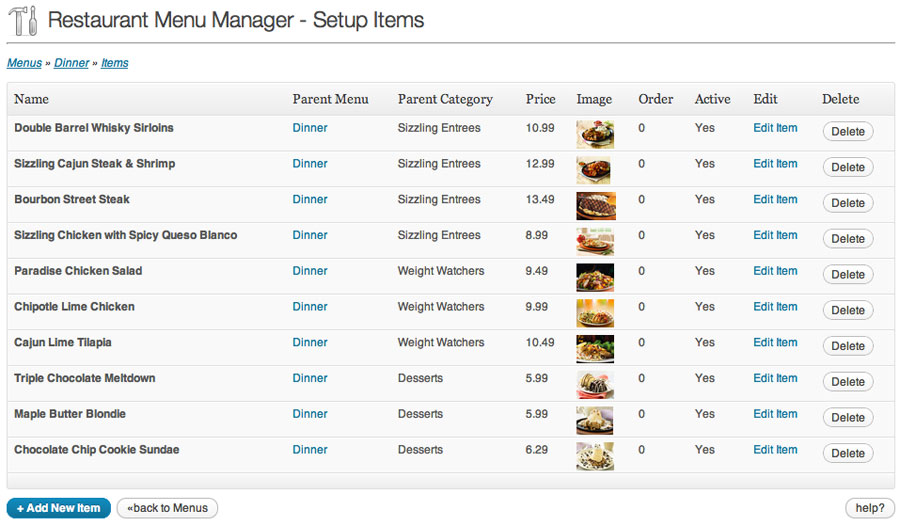
Installing This Plugin & Getting Started
- Go to “Plugins” on your WordPress site and press “Add New”
- Search “Easy Restaurant Menu Manager”
- Click Install
- You will be redirected to a new page. Click on “Activate Plugin”
- Click on “Settings” and “Easy Restaurant Menu Manager”
- You may now begin to start adding items to your menus
Plugin Tips
- Make sure to add high quality pictures to your menu items
- Make sure to write a description of the item just like on the menus you have in your restaurant. Include what the item is, what comes on the item, and what sides/extras are included in the price.
- Keep it simple.
If you have a restaurant business website I recommend this plugin and believe it is the best for adding a menu to your website. Hope this helps with choosing a plugin and getting the plugin set up on your website. If you have any questions please comment below.
Want your Restaurant Website to show up 1st on Google Learn How By Signing Up Here!
Very helpful post, thanks for sharing! My favorite tip: keep it simple. It’s really easy to over-complicate your point on the web. Simplicity makes the experience infinitely better.
Glad I could help! You are right people always think about making it look fancy and forget about how easily it functions and navigates.
Thanks for the comment!
Brok
Thanks for your informative and detailed post. It seems like adding this plugin is a pretty easy process.
Christie,
Yes very simple to install and use. Defiantly user friendly!
Thanks, This is great training. I thought about doing a venison receipe niche and this mite come in handy once i get there. Thanks again. Zach
Zach,
Glad to help! Good luck with your new niche website idea sounds like a good one!
Brok
Excellent post here. I definitely have an idea or three of things I would like to work on now!
Thanks for the kind words. Best of Luck To You!